
Katrice
Williams-Dredden
⁕
Senior Product Designer focused on enterprise systems, workflows, and operational tooling.
Available to work
case study
Compliance visibility, without leaving the workflow.
Compliance visibility, without leaving the workflow.
Compliance visibility, without leaving the workflow.
A contextual micro-app that gives compliance and ops teams real-time record-level audit trails, surfaced as a right-side drawer so users never lose their place.
A contextual micro-app that gives compliance and ops teams real-time record-level audit trails, surfaced as a right-side drawer so users never lose their place.
A contextual micro-app that gives compliance and ops teams real-time record-level audit trails, surfaced as a right-side drawer so users never lose their place.
Role
Lead Product Designer
Platform
Workflow Studio · Financial Services
Timeline
6 months • 2025
Discipline
Micro-App UX · Compliance Design
|
Enterprise Fintech
|
2023–present


Role
Lead Product Designer
Platform
Workflow Studio · Financial Services
Timeline
6 months • 2025
Discipline
Micro-App UX • Compliance Design
The problem
Compliance teams had no way to see who changed what.
Compliance teams had no way to see who changed what.
Compliance teams had no way to see who changed what.
The product had audit-trail data in the databse, but it wasn't easily accessible to non-technical users in a way that supported real investigations (people had the data but not the usable story of what happened).
The product had audit-trail data in the databse, but it wasn't easily accessible to non-technical users in a way that supported real investigations (people had the data but not the usable story of what happened).
The product had audit-trail data in the databse, but it wasn't easily accessible to non-technical users in a way that supported real investigations (people had the data but not the usable story of what happened).
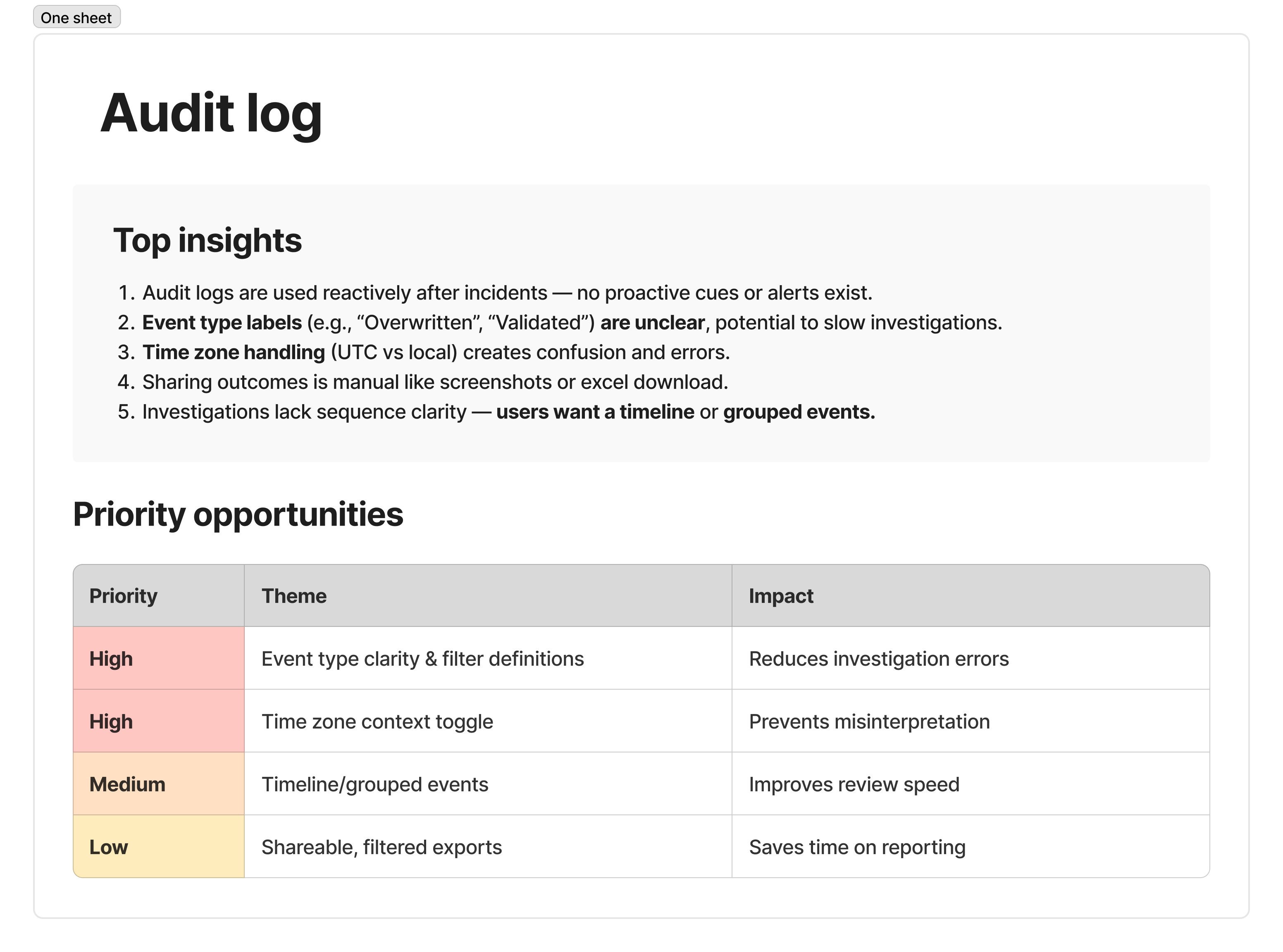
Event type labels are unclear (e.g., “Overwritten” vs “Validated”), which slows investigations and increases mistakes.
Timezone handling causes confusion (UTC vs local), leading to misinterpretation and errors.
Sharing is manual (screenshots / downloads) instead of shareable, filtered views or exports.
Sequence clarity is missing—users want a timeline or grouped events to reconstruct “what happened.”
Research & Discovery
What I found when I started asking.
What I found when I started asking.
What I found when I started asking.
Audit log data existed, but wasn't usable for non-technical users investigating incidents: unclear labels, timezone misreads, manual sharing via screenshots/exports, and no way to reconstruct event sequences from the list view.
This slowed investigations and increased misinterpretation risk, pushing teams toward exporting, screenshotting, and re-checking timelines. Research pointed to clearer event types/filters and timezone context as the highest-impact fixes, followed by grouped/timeline views and shareable filtered exports.
Audit log data existed, but wasn't usable for non-technical users investigating incidents: unclear labels, timezone misreads, manual sharing via screenshots/exports, and no way to reconstruct event sequences from the list view.
This slowed investigations and increased misinterpretation risk, pushing teams toward exporting, screenshotting, and re-checking timelines. Research pointed to clearer event types/filters and timezone context as the highest-impact fixes, followed by grouped/timeline views and shareable filtered exports.
Audit log data existed, but wasn't usable for non-technical users investigating incidents: unclear labels, timezone misreads, manual sharing via screenshots/exports, and no way to reconstruct event sequences from the list view.
This slowed investigations and increased misinterpretation risk, pushing teams toward exporting, screenshotting, and re-checking timelines. Research pointed to clearer event types/filters and timezone context as the highest-impact fixes, followed by grouped/timeline views and shareable filtered exports.
“The time being in UTC throws people off — a toggle would help.”
“The time being in UTC throws people off — a toggle would help.”
“The time being in UTC throws people off — a toggle would help.”


The Solution
A micro-app that lives inside the workflow, not outside it.
A micro-app that lives inside the workflow, not outside it.
A micro-app that lives inside the workflow, not outside it.
The solution direction is a hybrid approach that blends speed and clarity by keeping the most-used filters (data, event type, and user) visible inline while moving advanced filters into a drawer/pop-out to reduce clutter and support complex investigations.
Contextual access turns raw audit records into trustworthy evidence: timezone context prevents timeline misreads, clearer event-type definitions reduce investigation errors, timeline and grouped views help users reconstruct what happened, and shareable filtered exports cut down on manual screenshots and improve handoffs.
The solution direction is a hybrid approach that blends speed and clarity by keeping the most-used filters (data, event type, and user) visible inline while moving advanced filters into a drawer/pop-out to reduce clutter and support complex investigations.
Contextual access turns raw audit records into trustworthy evidence: timezone context prevents timeline misreads, clearer event-type definitions reduce investigation errors, timeline and grouped views help users reconstruct what happened, and shareable filtered exports cut down on manual screenshots and improve handoffs.
The solution direction is a hybrid approach that blends speed and clarity by keeping the most-used filters (data, event type, and user) visible inline while moving advanced filters into a drawer/pop-out to reduce clutter and support complex investigations.
Contextual access turns raw audit records into trustworthy evidence: timezone context prevents timeline misreads, clearer event-type definitions reduce investigation errors, timeline and grouped views help users reconstruct what happened, and shareable filtered exports cut down on manual screenshots and improve handoffs.
FEATURE 01
Contextual access, zero navigation.
Contextual access, zero navigation.
Contextual access, zero navigation.
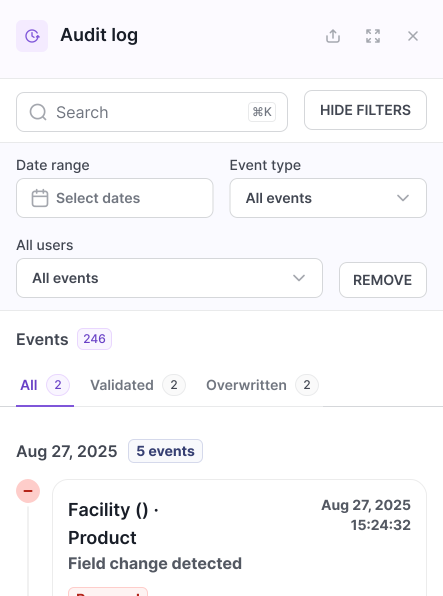
Users needed to work and review audit events without losing their place, so the drawer pushes the workspace over instead of overlaying and blocking it. This approach also set up a long-term pattern other micro apps could build on.
Users needed to work and review audit events without losing their place, so the drawer pushes the workspace over instead of overlaying and blocking it. This approach also set up a long-term pattern other micro apps could build on.
Users needed to work and review audit events without losing their place, so the drawer pushes the workspace over instead of overlaying and blocking it. This approach also set up a long-term pattern other micro apps could build on.
Right-side drawer opens without losing workflow context
Available from any step in the 8-step wizard
Real-time event feed, most recent first
Contributed drawer pattern back to Salt DS
Feature 02
Filter to exactly what matters.
Filter to exactly what matters.
Filter to exactly what matters.
The original design only supported a quick search, with no fuzzy matching, filtering, or sort options. Working directly with users, I designed a custom filter system for this workflow, then made it the default filtering experience for every workflow.
The original design only supported a quick search, with no fuzzy matching, filtering, or sort options. Working directly with users, I designed a custom filter system for this workflow, then made it the default filtering experience for every workflow.
The original design only supported a quick search, with no fuzzy matching, filtering, or sort options. Working directly with users, I designed a custom filter system for this workflow, then made it the default filtering experience for every workflow.
• Filter by event type: field changes, rule edits, status, publish
• Date range picker for scoped audit windows
• Filter by user for individual accountability
• Active filters persist across drawer open/close
FEATURE 03
Export for reporting and review.
Export for reporting and review.
Export for reporting and review.
Exports come in PDF or Excel format, letting teams pull this data into other tools for analytics and metrics tracking.
Exports come in PDF or Excel format, letting teams pull this data into other tools for analytics and metrics tracking.
Exports come in PDF or Excel format, letting teams pull this data into other tools for analytics and metrics tracking.
• CSV export with timestamp, user, event type, before/after values
• Export respects active filters
• Used by compliance for quarterly audit submissions
• Retention period: 90 days in-app, full history on request

Design Decisions
The choices that made it work.
The choices that made it work.
The choices that made it work.
01
Drawer over full page
Users needed to review audit events without leaving their work, so the drawer pushes the workspace aside instead of covering it. This also set up a pattern other micro apps (version history, comments, notifications) could reuse.
02
Read-only by design
The audit view never allows edits, since every entry is a historical record. Keeping it strictly read-only protects the trail's accuracy and kept the data model simple, with no separate permission logic to build.
03
Event language for humans
Raw event data wasn't built for users to parse. Each change was translated from system codes and field-level jargon into plain language, while staying tied exactly to the field that changed underneath.
04
Before/after values
Knowing something changed isn't enough; people need to see what it changed from and to. Showing both values side by side turned every entry into proof, not just a notification, and shaped how granularly engineering tracked field-level state.
05
Contributed to Salt DS
Rather than ship the drawer as a one-off, the component was abstracted into Salt DS so any team building a contextual panel could reuse the same pattern instead of building their own.
06
Built for filtering, not just searching
The original view only supported basic search, no fuzzy matching, filtering, or sorting. Working with users, a custom filter system was designed for this workflow, then generalized into the default for every workflow on the platform.
01
Drawer over full page
Users needed to review audit events without leaving their work, so the drawer pushes the workspace aside instead of covering it. This also set up a pattern other micro apps (version history, comments, notifications) could reuse.
02
Read-only by design
The audit view never allows edits, since every entry is a historical record. Keeping it strictly read-only protects the trail's accuracy and kept the data model simple, with no separate permission logic to build.
03
Event language for humans
Raw event data wasn't built for users to parse. Each change was translated from system codes and field-level jargon into plain language, while staying tied exactly to the field that changed underneath.
04
Before/after values
Knowing something changed isn't enough; people need to see what it changed from and to. Showing both values side by side turned every entry into proof, not just a notification, and shaped how granularly engineering tracked field-level state.
05
Contributed to Salt DS
Rather than ship the drawer as a one-off, the component was abstracted into Salt DS so any team building a contextual panel could reuse the same pattern instead of building their own.
06
Built for filtering, not just searching
The original view only supported basic search, no fuzzy matching, filtering, or sorting. Working with users, a custom filter system was designed for this workflow, then generalized into the default for every workflow on the platform.
Impact
What it delivered.
What it delivered.
What it delivered.
Outcome 1
40%
fewer compliance reviews requiring engineering pulls
fewer compliance reviews requiring engineering pulls
Outcome 2
5 min
saved per validation review
saved per validation review
Outcome 3
210+
workflows using the audit drawer pattern
Outcome 1
40%
fewer compliance reviews requiring engineering pulls
Outcome 2
5 min
saved per validation review
Outcome 3
210+
workflows using the audit drawer pattern
Before this, I had to ask engineering to pull logs just to answer a basic question about who changed what. Now I can just open the drawer and see it myself.
Before this, I had to ask engineering to pull logs just to answer a basic question about who changed what. Now I can just open the drawer and see it myself.
Before this, I had to ask engineering to pull logs just to answer a basic question about who changed what. Now I can just open the drawer and see it myself.
Compliance Reviewer · Usability session
WHAT'S NEXT
See the platform this lives inside.
See the platform this lives inside.
See the platform this lives inside.
The audit drawer is one piece of Workflow Studio, the no-code system this pattern was built for from day one.
The audit drawer is one piece of Workflow Studio, the no-code system this pattern was built for from day one.
The audit drawer is one piece of Workflow Studio, the no-code system this pattern was built for from day one.
WHAT'S NEXT
WHAT'S NEXT
Katrice
Williams-Dredden
⁕